Unconfigured Ad

Collapse
X
 
  • Filter
  • Time
  • Show
Clear All
new posts

  • lindenb
    replied
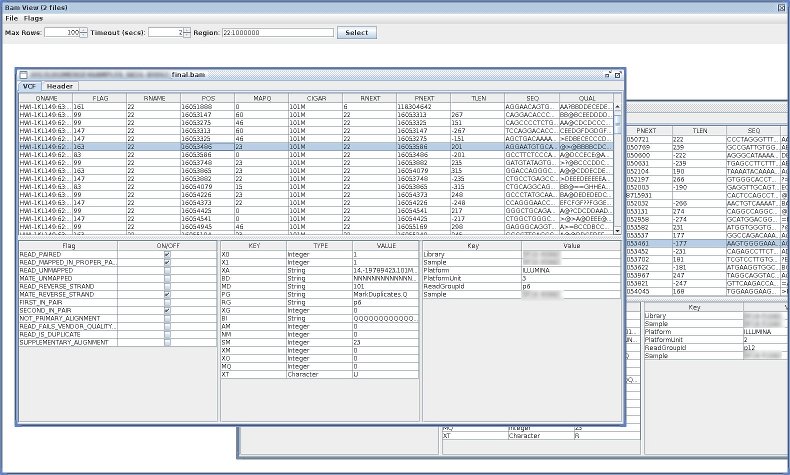
    Visualize Bam

    FYI: I wrote a simple java-based GUI to visualize some BAMS: https://github.com/lindenb/jvarkit/wiki/BamViewGui
    Leave a comment:


  • LeightonP
    replied
    You might want to consider the pysam module: http://wwwfgu.anat.ox.ac.uk/~andreas...tools/api.html and https://code.google.com/p/pysam/

    (EDIT: I see Devon already suggested this - apologies for the duplication0
    Last edited by LeightonP; 12-10-2013, 02:30 PM. Reason: Noticed duplication of advice.

    Leave a comment:


  • KnowNothing2
    replied
    Originally posted by dpryan View Post
    Glad I could help. BTW, I didn't deal with the header in my example. You might check "if(len(line) > 5): stuff" or check for a @ as the first character to get past the header (unless you want to parse it).
    Right, I'll have to figure out some of the details. Right now, I just have an idea what I want to perform, but no real idea how to execute. But I did just read through a tutorial that kind of went over the sort of info you presented, I was just unaware that you could do this directly to a sam file.

    Leave a comment:


  • dpryan
    replied
    Glad I could help. BTW, I didn't deal with the header in my example. You might check "if(len(line) > 5): stuff" or check for a @ as the first character to get past the header (unless you want to parse it).

    Leave a comment:


  • KnowNothing2
    replied
    Originally posted by dpryan View Post
    Generally something like the following will work:

    Code:
    import csv
    
    sam = csv.reader(open("foo.sam","r"), dialect="excel-tab")
    for line in sam :
        print("QNAME: %s" % (line[0]))
        print("Sequence: %s" % (line[9]))
    So, just use the column number. You can also use pysam, which makes some things much easier. If you're comfortable with C, I can also recommend the samtools C API. If you need higher performance, you'll find it quite useful.
    So that's basically exactly what I was looking for. Thanks!

    Leave a comment:


  • dpryan
    replied
    Generally something like the following will work:

    Code:
    import csv
    
    sam = csv.reader(open("foo.sam","r"), dialect="excel-tab")
    for line in sam :
        print("QNAME: %s" % (line[0]))
        print("Sequence: %s" % (line[9]))
    So, just use the column number. You can also use pysam, which makes some things much easier. If you're comfortable with C, I can also recommend the samtools C API. If you need higher performance, you'll find it quite useful.

    Leave a comment:


  • KnowNothing2
    replied
    Originally posted by dpryan View Post
    You really don't want to write macros to deal with data of this size. Try python/perl/C/whatever. You can use R, if you prefer, but I think it usually reads everything into memory too.
    I'm actually trying to write in python. How do I notate a certain variable in a sam file (I'm very new to python bioinformatics).

    Leave a comment:


  • dpryan
    replied
    You really don't want to write macros to deal with data of this size. Try python/perl/C/whatever. You can use R, if you prefer, but I think it usually reads everything into memory too.

    Leave a comment:


  • KnowNothing2
    replied
    Originally posted by dpryan View Post
    Well, you can probably open it in libre office if it's small enough (it does read it into memory). Why you would actually want to do that is beyond me.
    Basically to write a program

    Leave a comment:


  • dpryan
    replied
    Well, you can probably open it in libre office if it's small enough (it does read it into memory). Why you would actually want to do that is beyond me.

    Leave a comment:


  • GenoMax
    replied
    Are we talking about an alignment file? Why do you want to open it in a spreadsheet program? If you need to make a change there may be an alternate option available.

    Leave a comment:


  • What linux spreadsheet program can you open .sam files in?

    Tried opening it in libre office calc but the program just freezes

Latest Articles

Collapse

  • SEQadmin2
    Advanced Sequencing Platforms Tackle Neuroscience’s Toughest Genomics Problems
    by SEQadmin2


    Genomics studies in neuroscience face a special challenge due to the brain’s complexity and scarcity of samples. Mapping changes in cell type and state using conventional next-generation sequencing methods remains challenging. Advances in technologies like single-cell sequencing, spatial transcriptomics, and long-read sequencing have opened the door to deeper studies of the brain and diseases like Alzheimer’s, amyotrophic lateral sclerosis (ALS), and schizophrenia.
    ...
    07-09-2026, 11:10 AM
  • SEQadmin2
    Cancer Drug Resistance: The Lingering Barrier to Rising Survival
    by SEQadmin2


    Cancer survival rates have significantly increased in the last few decades in the United States, reaching a combined 70% 5-year survival rate by 2021. Behind this number, there are years of research to find new therapies, drug targets, and early detection methods. But there is one core challenge that keeps slowing down these advances, and it’s about drug resistance.

    There is no single reason why many patients don’t respond to treatment as expected. Cancer is...
    07-08-2026, 05:17 AM
  • GATTACAT
    Reply to Nine Things a Sample Prep Scientist Thinks About Before Sequencing
    by GATTACAT
    Love this - good data definitely starts from good input, and poor input can only give relatively poor data. I particularly like the mention of Nanodrop/absorbance based methods for quantification. It's such a toss up if you'll get an accurate reading or what amounts to a randomly generated number, and a lot of library/sequencing related issues can be traced back to poor quant.
    07-01-2026, 11:43 AM

ad_right_rmr

Collapse

News

Collapse

Topics Statistics Last Post
Started by SEQadmin2, Yesterday, 10:26 AM
0 responses
15 views
0 reactions
Last Post SEQadmin2  
Started by SEQadmin2, 07-09-2026, 10:04 AM
0 responses
29 views
0 reactions
Last Post SEQadmin2  
Started by SEQadmin2, 07-08-2026, 10:08 AM
0 responses
16 views
0 reactions
Last Post SEQadmin2  
Started by SEQadmin2, 07-07-2026, 11:05 AM
0 responses
33 views
0 reactions
Last Post SEQadmin2  
Working...