Unconfigured Ad

Collapse
X
 
  • Filter
  • Time
  • Show
Clear All
new posts
  • Drake
    Member
    • Apr 2009
    • 10

    #46
    Thanks for your answers ..

    It's a pity that there is no simple button to export this region ... so I will stay with my MAQ flat files in cyqwin ...

    Comment

    • WJW-Davy
      Member
      • Feb 2009
      • 23

      #47
      MapView 3.1.4 The SNP list can be exported to a flat file.

      Download Link : https://sites.google.com/site/wjwdavy/

      [Change Log - main versions]

      3.1.4 [2009.5.2]
      Text can be copyed from SNP list.
      MVR file can be converted to text file. The SNP list can be exported to a flat file.


      3.0 [2009.3.8]
      Significant improvement.
      Quality Score, Paired-end data, structure variation, coverage distribution, quality distribution, text quick view, zoom in/out, and other features are supported.

      2.0 [2008.12.16]
      Significant improvement.
      Support many formats. Fasta format and text-based alignment results file(output by Eland, Maq, SOAP, MapNext, SeqMap … …).

      1.0 [2008.11.28]
      This is the first attempt.
      Only support MapNext's format
      Last edited by WJW-Davy; 05-05-2009, 04:43 AM.
      WJW-Davy
      HomePage: http://hi.baidu.com/wjwdavy
      Download Center: https://sites.google.com/site/wjwdavy/

      Comment

      • WJW-Davy
        Member
        • Feb 2009
        • 23

        #48
        Originally posted by garwuf View Post
        <i>is there a way to export the SNP list to a flat file? Like the one maq produces?</i>

        I'm using HyperSnap (screen capture program) for that. It has text capture mode, can get text from scrolling windows and output it in tab-delimited format. I guess SnagIt also might do something like that. Unfortunately, both these software pieces are commercial.
        Originally posted by Drake View Post
        Thanks for your answers ..

        It's a pity that there is no simple button to export this region ... so I will stay with my MAQ flat files in cyqwin ...
        MapView 3.1.4 can export the SNP list to a flat file. You can text from SNP list.
        It has the simple button now. ^_^
        Last edited by WJW-Davy; 05-01-2009, 07:49 PM.
        WJW-Davy
        HomePage: http://hi.baidu.com/wjwdavy
        Download Center: https://sites.google.com/site/wjwdavy/

        Comment

        • Drake
          Member
          • Apr 2009
          • 10

          #49
          That's awesome! ... You added this feature very quick! Thanks a lot! I really appreciate!

          Comment

          • Drake
            Member
            • Apr 2009
            • 10

            #50
            There is another question I have and you might think about?
            I am doing a lot of comparisons and therefore I am jumping between two views a lot.
            So for my analysis it would be useful to load e.g. two different MVR files into the program with a split screen and to scroll through both screens at the same time.
            I don't know how complicated it could be to add or even how useful it could be for other people, but maybe this is something you would be interested in?

            Thanks!

            Comment

            • WJW-Davy
              Member
              • Feb 2009
              • 23

              #51
              Originally posted by Drake View Post
              There is another question I have and you might think about?
              I am doing a lot of comparisons and therefore I am jumping between two views a lot.
              So for my analysis it would be useful to load e.g. two different MVR files into the program with a split screen and to scroll through both screens at the same time.
              I don't know how complicated it could be to add or even how useful it could be for other people, but maybe this is something you would be interested in?

              Thanks!
              like that?


              At present, you can run many MapViews and load many MVF files.
              In one MapView, you can open many SNP Lists.
              WJW-Davy
              HomePage: http://hi.baidu.com/wjwdavy
              Download Center: https://sites.google.com/site/wjwdavy/

              Comment

              • Drake
                Member
                • Apr 2009
                • 10

                #52
                Yes .. that's the way I do it now.

                But I am looking for something to do it simultaneously. I have attached a screenshot where I have put two views horizontal. Now it would be nice, to have these two screens position-wise exactly one above the other. And one scroll bar between them to scroll at the same time through both alignments.
                Attached Files

                Comment

                • WJW-Davy
                  Member
                  • Feb 2009
                  • 23

                  #53
                  Originally posted by strob View Post
                  Hello,

                  I'm using Mapview and it works fine. A feature that could be useful to be included is to show the reference and its coverage. Not on top like now, but maybe as a separate feature, having the reference presented as a bar and the parts which are covered could have a certain color (maybe depending on the amount of reads covering that region). In this way I could compare my annotation shown in a GenomeBrowser with the mapping of my exon reads on the reference.

                  Many thanks
                  Great! I have started a new version and will add this feature.
                  WJW-Davy
                  HomePage: http://hi.baidu.com/wjwdavy
                  Download Center: https://sites.google.com/site/wjwdavy/

                  Comment

                  • lparsons
                    Member
                    • Nov 2008
                    • 28

                    #54
                    Originally posted by strob View Post
                    A feature that could be useful to be included is to show the reference and its coverage. Not on top like now, but maybe as a separate feature, having the reference presented as a bar and the parts which are covered could have a certain color (maybe depending on the amount of reads covering that region). In this way I could compare my annotation shown in a GenomeBrowser with the mapping of my exon reads on the reference.
                    Many thanks
                    What would be useful would be a feature to export the coverage in a BED/WIGgle file that could be ready by GenomeBrowser or other similar tools. It would eliminate an extra step in my processing pipeline.

                    Of course, the killer feature would to be able to visualize the various annotation tracks on GenomeBroswer from within MapView along with the reads. I've seen a few commercial programs that do this, but even they were still a bit clunky.

                    Comment

                    • Drake
                      Member
                      • Apr 2009
                      • 10

                      #55
                      Hi again,
                      I became really interested in MapView; but unfortunately there are a few things making the output hard to trust.
                      For example: I have a bad reference strain (bad means that there are ambiguous bases 'N' or 'S' in it). Then MapView produces an odd output for the reference. I have attached two cut screen shots. One is from MapView and one is from the NCBI viewer. Both have the same reference sequence.
                      When you look at the MapView output, you see that on position 71275 and 71277 are ambiguous bases. Now look on the position after these two (71276, 71278 and 71279) .. you will see three 'T's and only one of the is true. You can easily compare it with the NCBI view. The marker is positioned on 71275. Position 71276 is a 'G', 71278 is a 'T' (this one is correct) and 71279 is a 'C'.

                      Any suggestions why this happens?
                      Attached Files
                      Last edited by Drake; 05-06-2009, 07:38 AM.

                      Comment

                      • baohua100
                        Senior Member
                        • Jun 2008
                        • 103

                        #56
                        Originally posted by Drake View Post
                        Hi again,
                        I became really interested in MapView; but unfortunately there are a few things making the output hard to trust.
                        For example: I have a bad reference strain (bad means that there are ambiguous bases 'N' or 'S' in it). Then MapView produces an odd output for the reference. I have attached two cut screen shots. One is from MapView and one is from the NCBI viewer. Both have the same reference sequence.
                        When you look at the MapView output, you see that on position 71275 and 71277 are ambiguous bases. Now look on the position after these two (71276, 71278 and 71279) .. you will see three 'T's and only one of the is true. You can easily compare it with the NCBI view. The marker is positioned on 71275. Position 71276 is a 'G', 71278 is a 'T' (this one is correct) and 71279 is a 'C'.

                        Any suggestions why this happens?

                        This a little bug about ambiguous base. We will fix it soon!

                        Thank you for your message!

                        Comment

                        • WJW-Davy
                          Member
                          • Feb 2009
                          • 23

                          #57
                          Originally posted by Drake View Post
                          Hi again,
                          I became really interested in MapView; but unfortunately there are a few things making the output hard to trust.
                          For example: I have a bad reference strain (bad means that there are ambiguous bases 'N' or 'S' in it). Then MapView produces an odd output for the reference. I have attached two cut screen shots. One is from MapView and one is from the NCBI viewer. Both have the same reference sequence.
                          When you look at the MapView output, you see that on position 71275 and 71277 are ambiguous bases. Now look on the position after these two (71276, 71278 and 71279) .. you will see three 'T's and only one of the is true. You can easily compare it with the NCBI view. The marker is positioned on 71275. Position 71276 is a 'G', 71278 is a 'T' (this one is correct) and 71279 is a 'C'.

                          Any suggestions why this happens?
                          It is about dealing with ambiguous bases. I have found the bug and fixed it. Thank you.

                          I will release the new version as soon as possible. And sta2txt feature will be added.
                          WJW-Davy
                          HomePage: http://hi.baidu.com/wjwdavy
                          Download Center: https://sites.google.com/site/wjwdavy/

                          Comment

                          • WJW-Davy
                            Member
                            • Feb 2009
                            • 23

                            #58
                            download link:https://sites.google.com/site/wjwdav...attredirects=0

                            3.2.0 [2009.5.7]
                            The bug about dealing with ambiguous nucleotides was fixed. (Note: In order to deal with ambiguous nucleotides correctly, new MVF file should be made. )
                            sta2txt feature was added.
                            WJW-Davy
                            HomePage: http://hi.baidu.com/wjwdavy
                            Download Center: https://sites.google.com/site/wjwdavy/

                            Comment

                            • WJW-Davy
                              Member
                              • Feb 2009
                              • 23

                              #59
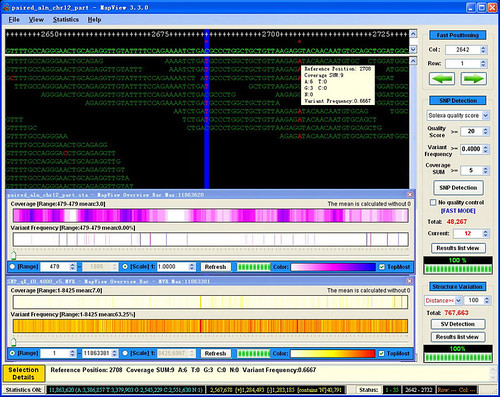
                              3.3.0 [2009.5.10]
                              The feature 'Overview Bar' map was added.
                              Double-click one line of SNP list to jump to its position not its SNP No.

                              Download Link 1: https://sites.google.com/site/wjwdav...attredirects=0

                              Last edited by WJW-Davy; 05-10-2009, 03:46 AM.
                              WJW-Davy
                              HomePage: http://hi.baidu.com/wjwdavy
                              Download Center: https://sites.google.com/site/wjwdavy/

                              Comment

                              • Drake
                                Member
                                • Apr 2009
                                • 10

                                #60
                                variant frequency

                                Hello again,
                                Can anyone explain me how the 'VariantFrequency' in the stat file is calculated?
                                I mean, it's obvious how the frequency is calculated for one variant base. But how is it done for two or three variant bases?
                                I also attached an excerpt from my stat file. Row 369 and 370 are clear to me, but would anyone be so kind to explain me the other two?

                                Thanks in advance!
                                Attached Files

                                Comment

                                Latest Articles

                                Collapse

                                • SEQadmin2
                                  From Collection to Sequencing: Why Sample Preparation and Preservation Define Sequencing Data
                                  by SEQadmin2


                                  Data variability is still an issue in sequencing technologies despite the advances in reproducibility and accuracy of these platforms. But the problem does not originate in the sequencing itself, but in the previous steps, before the sample reaches the sequencer.


                                  The first step is collection, followed by preservation and sample preparation for analysis. Most scientists overlook those steps, but not being careful might just be skewing the experiment’s results.
                                  ...
                                  06-02-2026, 10:05 AM
                                • SEQadmin2
                                  Single-Cell Sequencing at an Inflection Point: Early Impacts of New Platforms and Emerging Trends
                                  by SEQadmin2


                                  With the launch of new single-cell sequencing platforms in 2026, the field stands at an exciting inflection point. This article surveys the most impactful advances in the field and discusses how they’re reshaping research in cancer, immunology, and beyond.


                                  Introduction

                                  Single-cell sequencing technologies have undergone remarkable advances over the past decade, transitioning from low-throughput experimental approaches to highly scalable platforms capable of...
                                  05-22-2026, 06:42 AM
                                • SEQadmin2
                                  Environmental Genomics in the Age of NGS: From Microbes to Conservation Strategies
                                  by SEQadmin2

                                  Studying ecosystems means dealing with complex, multi-species communities that are hard to observe at scale. This complexity, however, hides many important questions to be answered, from how biogeochemical cycles work and how climate change can affect species distribution to how conservation strategies can work best.


                                  Genomics, particularly since the expansion of NGS, has transformed ecosystem ecology. By sequencing environmental DNA, we can now assess biodiversity without direct...
                                  05-06-2026, 09:04 AM

                                ad_right_rmr

                                Collapse

                                News

                                Collapse

                                Topics Statistics Last Post
                                Started by SEQadmin2, Today, 08:59 AM
                                0 responses
                                8 views
                                0 reactions
                                Last Post SEQadmin2  
                                Started by SEQadmin2, 06-02-2026, 12:03 PM
                                0 responses
                                21 views
                                0 reactions
                                Last Post SEQadmin2  
                                Started by SEQadmin2, 06-02-2026, 11:40 AM
                                0 responses
                                15 views
                                0 reactions
                                Last Post SEQadmin2  
                                Started by SEQadmin2, 05-28-2026, 11:40 AM
                                0 responses
                                29 views
                                0 reactions
                                Last Post SEQadmin2  
                                Working...